IMPORTANT: A paid subscription is required to access this feature. Users on the Free version, are able to access their calculated super amounts through the Superannuation Fund Summary Reporting, and the funds will need to be disbursed manually.The SAFF file acts as an easy way to get a consolidated file for the super payments that need to be made to the employees on behalf of the business. It can be generated from ClockOn and uploaded to your selected Super Clearing House in order to disburse the funds from your business account to the employee's super funds.
With the upcoming introduction of PayDay Super, we are working toward an integration with BEAM Super. When released this will provide an in-app alternative to the SAFF export file. We will advise with an app notification once this feature is available.This article contains information on the following;
- Exporting the SAFF file
- Common Questions & Issues
- The totals amounts on my SAFF file do not match the Payroll report super column
- An employee is missing from the SAFF export
- The superfund's details are incomplete
- The employee is over the age where they are able to be paid super
- Ruleset settings for employees under the age of 18
- The super reports show different funds, but the SAFF file has the amounts as a single line item
Exporting the SAFF file
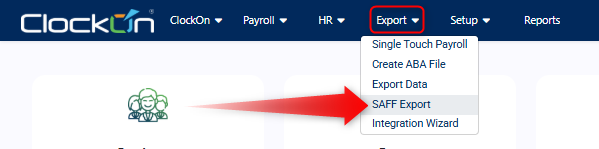
The SAFF file can be generated using the Export menu and selecting SAFF Export.
Use the Payroll Period selector to choose a range and use the Load button, if there are periods within this range the Payroll Range and Payroll Ids dropdowns will be populated.
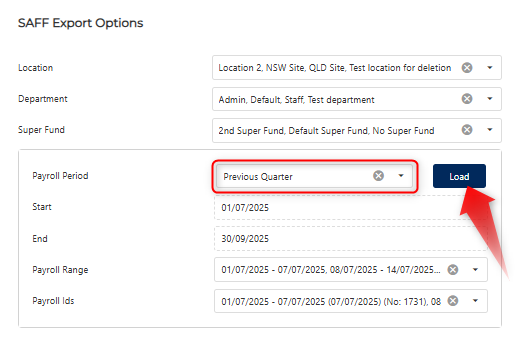
NOTE: This will use the payrolls Payment Date to determine whether the periods should be included in the range.When you are ready use the Export button to complete the process, this will generate the file and save it to the Downloads folder on your system.
To complete the process you will need to log onto your super clearing house provider to upload the file.
Common Questions & Issues
With any upload between systems there is the potential for issues to arise due to items such as out of date/incomplete data or general configuration issues. Below are some common issues that have been reported to us and how you can look to resolve them.
The totals amounts on my SAFF file do not match the Payroll report super column
This could be due to a few factors, the first thing to check is that all of the employees that were calculated for super are included in the file (see below).
Another thing to check is that the amounts marry up to the Superannuation Fund Summary Report (Payment type, Addition) report. If the amounts differ this may need further investigation by our support team, contactable at support@clockon.com.au.
An employee is missing from the SAFF export
Employees will only appear on the SAFF export if they are assigned to a superfund before the file is exported. If an employee is missing, check that they have a fund set on their Employee Details profile as detailed in our Super Funds - Linking a Fund To an Employee article.
The superfund's details are incomplete
Before generating the export and making the submission, it is best practice to confirm that the super fund details are complete with their name, ABN and USI information. Self-managed superfunds will require additional information, please see our Super Funds guide for more details.
The employee is over the age where they are able to be paid super
Customers have reported errors returned from super funds advising that they cannot submit for them as their age exceeds a contribution cap. This is usually due to restrictions on them making voluntary contributions such as salary sacrifice or co-contributions. For more information on this item please see the ATO's Restrictions on voluntary contributions article.
Ruleset settings for employees under the age of 18
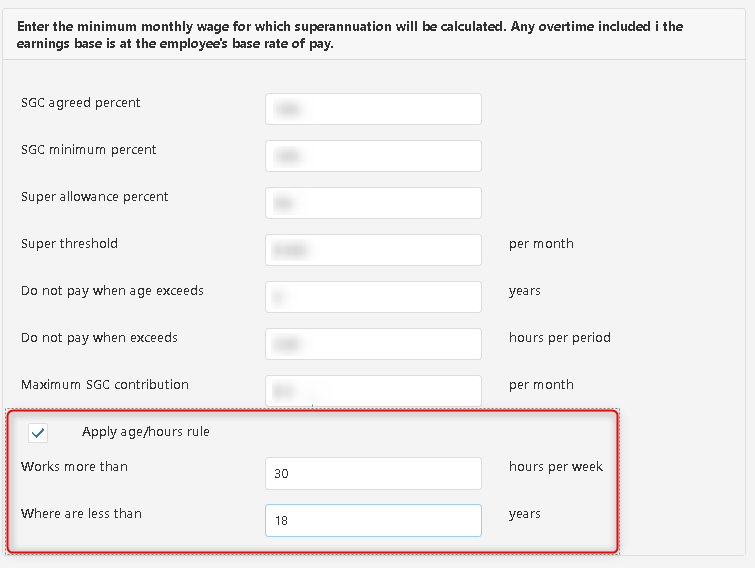
Employees under 18 years old have some specific rules ATO - Employees under 18. ClockOn can be configured to cater for this within the Award > Rule Set > Super settings.
At this time of writing the rule conditions are that to qualify for SGC contributions, employees under 18 years old need to meet a requirement of 30 hours per week.
For more information on if you are required to pay super for your employees please see the ATO's Work out if you have to pay super guide.
The super reports show different funds, but the SAFF file has the amounts as a single line item
The super reports are based off the historical payments to the funds that the employees were linked to at the point of time that the payroll was completed. We have found that issues arise if the SAFF file directly uses this information as employees if the employees change and merge funds. In short this is done to ensure that the SAFF file is always sending the amounts to their current super fund.