The following article details how customers can gain support for their ClockOn service based based on their chosen agreement. To identify which agreement you are currently using please see the Subscription Manager.
Access the Subscription Manager screen may be limited on your account if you are a standard user, or an employee. If you are not able to see this please contact your ClockOn Administrator.This article covers the support access and availability through the following topics;
- Support Verified Users
- Starter (Free) Users
- Subscription (Paid) Users
- Knowledge Base Account
- Contacting Us Via Phone (Phone Support Subscription Required)
Support Verified Users
Before our team is able to assist we need to first add the users for your company to our support system. This is a security measure to prevent unintended access or details being shared with the wrong individuals.
Users can be registered by advising our team in writing to our support team from an existing authorised user's email address.
If a user contacts us and we have not received prior advice, we will first need to check with the account owner before assistance can be provided.Starter (Free) Users
User on this package do not typically have access to our team directly, but have the options for support.
- Use the chatbot from within ClockOn.
- Use the ClockOn Knowledge Base to help find a solution.
- Explore our YouTube channel - New users with simple requirements may find our How to Setup STP in ClockOn (Manually Enter Gross Wages method) video useful.
If further support is needed on this contact, you can contact our support team for assistance at support@clockon.com.au. Please be aware that professional service fees may apply.
Subscription (Paid) Users
In addition to the previous resources, customers with a paid subscription gain access to our support team via email and knowledge base tickets.
Our team can provide direction and assistance with the use of the system, and troubleshooting issues. If your query requires something extensive that you would like our team to preform, such as a re-processing payrolls or leave re-calculations then the team may advise on additional professional services charges to apply.
Knowledge Base Account
Users can create an account through our support portal by logging in and using the New Support Ticket option.
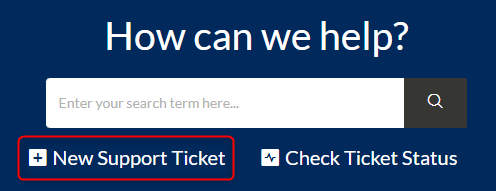
This will present a form where you can enter the details for your query and submit it to our team.
Logging in
If you have not logged into this portal this will show as Login to submit a new ticket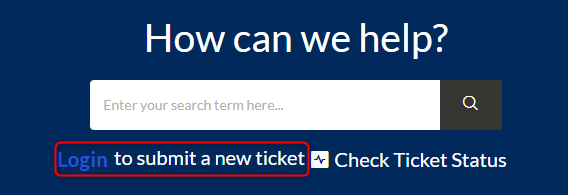
This will take you to a login screen, if you do not have or are unsure of your password please use the Forgot your password? link.
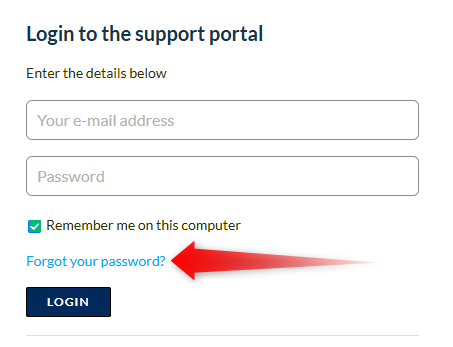
Please note that this uses a different system from your ClockOn login. the password will likely be different from your standard ClockOn account Checking ticket status
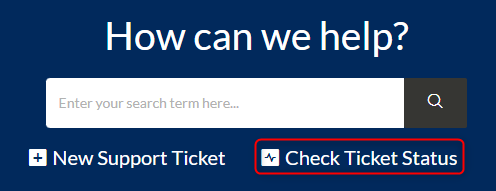
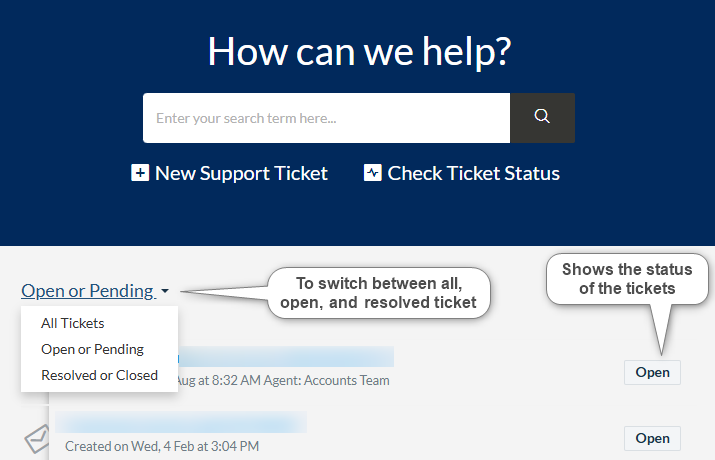
In conjunction to receiving emails related to tickets as they are updated, users can check and reply to their ticket status through the portal using the Check Ticket Status option.
Contacting Us Via Phone (Phone Support Subscription Required)
Customers that have signed up to the phone support package (number provided after signup) can call our team and receive assistance with the product.
When contacting our team you will be prompted to select a department to direct your call to the correct area, the options include:
- Support
For questions, queries, and problems around the use of the system or unexpected occurrences. - Sales
For purchase or upgrade enquiries. - Outsourced Payroll
For customers that have signed up with our team for us to provide direct advice and handle the configuration settings to keep the system compliant and process the payroll on the customer's behalf. - Training & Implementation
For new customers that have purchased an implementation setup service and for requests for booking training sessions. - Accounts
For queries relating to billing enquiries and account management.
We strongly suggest using the correct extension as the incorrect choice can lead to delays with transfers or message transfers.
Customers who call and do not have a phone support will be advised on the alternate methods to gain support by our team.
If the team is not available please leave a voicemail and we will respond soon. If there are a large number of calls a higher assessment priority may be provided for voicemail messages where the reason for the call is provided.